
Bart Support
Bulk operations
Learn more about ‘Bulk Operations‘ on the intranet
Bulk Operations – How To
Steps
- Select your ‘Profile picture‘ and then ‘Manage Content‘
- You will be redirected to the ‘Manage Content‘ screen

Manage content – Home screen
- Use the ‘Sort by‘ and ‘Filter by‘ options to access the ‘Content‘ you would like to complete ‘Bulk actions‘ for
- Select the ‘Checkbox‘ next to the ‘Content‘ of your choice#
- Once you have selected ‘One‘ or ‘Multiple‘ pieces, select the ‘Bulk Actions‘ button
- Here you can ‘Update‘ the following:
- ‘Workflow state‘
- ‘Menu item‘
- ‘Owner‘
- Select ‘Apply‘
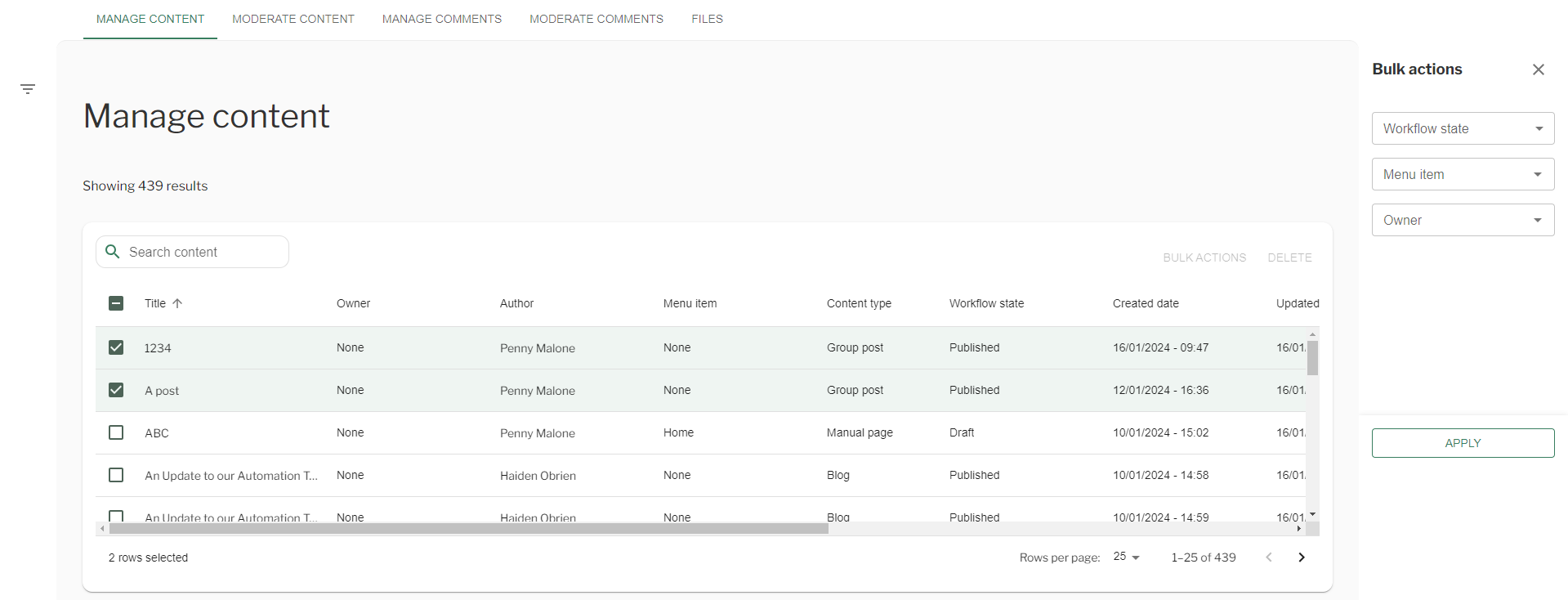
Manage Content – Bulk Operations
Couldn't find what you're looking for?
We're here to help. Please raise a support request via our help desk and we'll get back to you asap